
No products in the cart.
Return To Shop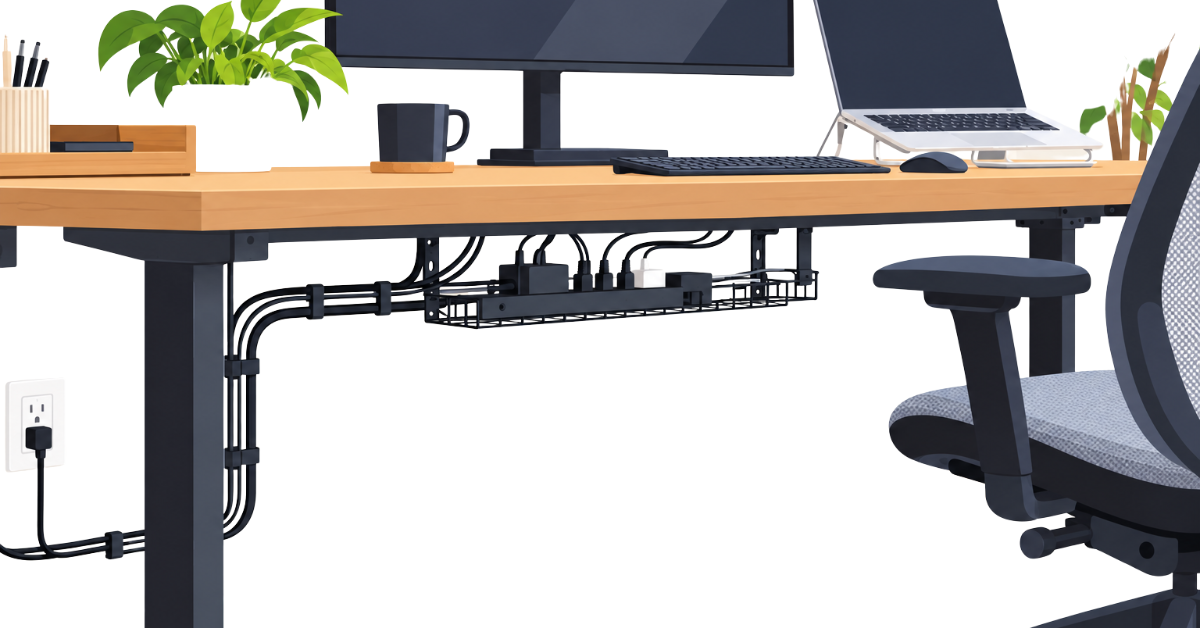
Desk Cable Management: How to Organize Cords and Keep Them Manageable
A desk can be well organized and still look cluttered because of the cables running behind it, beneath it and across the work surface. Laptop chargers, monitor connections, phone cables and power cords can quickly become tangled, difficult to identify or inconvenient to reach.
The problem isn’t necessarily that you have too many cables. Often, the cables simply lack a clear route or a consistent place to go when they’re not in use.
Good desk cable management starts with understanding your existing setup. Before buying accessories or trying to hide every wire, identify which connections you actually need, decide where the cables should run and consider which ones must remain accessible.
If you’re organizing the wider workspace as well as its cables, our guide to home office organization ideas explains how to create a practical system for your desk, supplies and storage.
In this guide, we’ll walk through how to audit your cables, plan sensible routes, organize under-desk and desktop connections, manage chargers, and adapt your approach to different workspaces. We’ll also cover simple safety considerations and ways to keep the arrangement manageable as your equipment changes.
The goal isn’t to make every cable invisible. It’s to create a setup where connections are easier to identify, wires stay out of the way and everyday adjustments don’t turn into another tangle.
Label Cables and Make Connections Easier to Identify
If you have several similar cables behind your desk, identifying which one belongs to which device can save time when something needs to be unplugged or moved.
You don’t need to label every wire. Focus on connections that are difficult to distinguish, particularly when multiple monitors, adapters or peripherals are involved.
Use short, clear labels that identify the connected device or the cable’s purpose. Where necessary, label both ends so you can trace the connection without following the wire through a crowded area.
For a simple laptop setup, remembering which cable belongs to the charger or monitor may be enough. For a more complex workstation, a few labels can make troubleshooting and future changes easier.
Keep the approach proportionate to your setup: label the connections that cause confusion, and leave the rest alone.
Start With a Cable Audit
Before rearranging your desk cables, take a quick look at what’s connected and where the wires are going. This helps you avoid unplugging something unnecessarily or spending time organizing cables you don’t even use.
Start by checking the cables around your laptop or computer, monitor, charger and other devices. Notice which wires are connected and which are simply lying around the desk or floor.
Separate spare cables and chargers from those you use every day. Keep useful spares together in one place, and set aside anything you no longer need.
If you find a cable whose purpose isn’t clear, identify it before unplugging or discarding it. Otherwise, there’s no need to disconnect everything just to get started.
You don’t need to create a detailed inventory or label every wire. Simply establish what needs to stay connected, what can be stored away and which cables are causing the most clutter.
Once you know that, you can plan how to route the cables that remain.
Plan Your Cable Routes Before Rearranging Anything
Once you’ve identified the cables you need, decide where they should run. A little planning can prevent you from bundling everything together only to discover that a cable is too short, difficult to reach or in the way of your equipment.
Start by tracing the route from each device to its connection point. Look for a simple path that keeps cables away from your work area and reduces loose wires hanging behind or beneath the desk.
Keep connections you regularly unplug easy to reach. Cables for a stationary monitor or desktop computer can usually follow a more permanent route, while laptop chargers and phone cables may need enough flexibility for everyday use.
Also consider how your desk is used. Leave room for drawers to open, chairs to move and equipment to be adjusted without pulling on the cables. If you use a standing desk, account for its full range of movement before securing any wires.
You don’t need to plan every cable individually on paper. Simply decide which cables can follow the same route, which need to remain flexible and where they should be kept out of the way.
With a clear route in mind, you can begin organizing the cables beneath the desk.
Organize Cables Under the Desk
The space beneath a desk is often where loose cables accumulate, become tangled or get caught around chair legs. Once you’ve planned their routes, focus on keeping the wires grouped and out of the way.
Start by bringing cables that follow the same route together where practical. Keep them away from your feet and chair wheels, and avoid letting extra cable length collect in loose piles on the floor.
If you use a power strip or adapter beneath the desk, place it somewhere accessible and protected from accidental knocks, spills and crushing. You should be able to reach the connections when needed without crawling through a tangle of wires.
Cable clips, ties or an under-desk tray may help if your current arrangement needs them, but you don’t have to buy anything immediately. First see whether repositioning existing cables and grouping them sensibly solves the problem.
Leave enough slack for normal adjustments, and don’t stretch cables tightly or trap them against moving parts. The aim is to keep the area tidy while making connections safe, accessible and easy to trace.
Manage Cables on and Behind the Desk
Not every cable needs to run beneath the desk. Monitor connections, laptop chargers, phone cables and other frequently used leads may need to remain accessible on the work surface or behind your equipment.
Start by routing each cable along the shortest practical path that doesn’t interfere with your work. Keep loose wires away from your keyboard, mouse area and other surfaces you use regularly.
Where several cables run behind a monitor or computer, group them along a common route if doing so doesn’t make individual connections difficult to trace. Use simple cable clips or ties only where they help keep wires in place.
For devices you regularly unplug, such as a laptop or phone, leave the cable end easy to reach. Avoid securing it so tightly that reconnecting the device becomes inconvenient.
You don’t need to eliminate every visible wire. A few neatly routed cables are often more practical than a completely hidden arrangement that’s difficult to adjust or troubleshoot. The goal is to reduce distractions and keep connections accessible while allowing your equipment to work as intended.
Organize Charging Cables and Spare Connections
Charging cables and spare leads can quickly become tangled when they’re left wherever they were last used. A simple system keeps the cables you need regularly accessible without allowing spares to spread around the workspace.
Keep your everyday chargers in a consistent place. If you regularly charge a phone or other portable device at your desk, choose a convenient route for its cable and return the lead to that place after use.
Store spare cables separately from active connections. Group them loosely by purpose or device where this makes them easier to identify, rather than mixing every lead into one tangled bundle.
Avoid keeping a large collection of unidentified cables just in case they might be useful. If you don’t recognize a cable, identify it before deciding whether to retain it. Keep useful spares that match equipment you still use, and remove those you can confidently identify as unnecessary.
The goal isn’t to organize every spare cable individually. It’s to know where your everyday chargers are, keep useful replacements easy to find and prevent unused leads from becoming another source of clutter.
Adapt Cable Management to Your Desk and Workspace
The best cable-management arrangement depends on your desk, the equipment you use and whether the workspace can be changed permanently. A setup that works for a large desk may not suit a small workstation or a shared room.
If you’re still planning the practical foundation of your workspace, our remote work setup guide covers the wider setup decisions that surround your desk and equipment.
Cable Management for a Small Desk
With limited space, focus on the cables that interfere most with your work. Route them along the edges or behind equipment where practical, and keep spare leads away from the main work surface.
Avoid adding organizers that take up more space than they save. Grouping existing cables and choosing sensible routes may be enough to make a noticeable difference.
Cable Management for a Standing Desk
A standing desk moves, so its cables need enough slack to accommodate the full range of height adjustment.
Before securing anything, raise and lower the desk carefully while checking that cables aren’t stretched, pinched or caught on moving parts. Keep loops and excess cable away from the frame and other areas where they could snag.
Recheck the arrangement if you change equipment or move connection points. A route that works at one desk height may not work at another.
Cable Management for a Shared or Multipurpose Workspace
If your desk is used by more than one person or serves several purposes, keep frequently moved cables easy to access and return.
Group cables by device or purpose, and give portable chargers and accessories a consistent place when they aren’t being used. Avoid routing wires across areas that need to remain clear for other activities.
The system should be easy for anyone using the workspace to understand and maintain.
Cable Management Without Drilling or Permanent Changes
If you rent your home, share a workspace or simply don’t want to modify furniture, start with reversible changes.
You can often improve an arrangement by repositioning existing cables, grouping them along a common route and keeping spare leads stored separately. If you later decide to use clips or other accessories, check that they are suitable for the desk surface and can be removed without causing damage.
You don’t need to install a permanent system to keep cables manageable. Choose an arrangement that suits your workspace and can be changed easily when your needs change.
Keep Cable Management Safe and Practical
Cable management should make your workspace easier to use without creating new hazards. Keeping wires tidy is useful, but cables must remain in good condition and should not be routed where they can be damaged.
Keep these practical precautions in mind:
- Avoid damaged cables. Replace cords with frayed insulation, exposed wires, cracked plugs or other visible damage.
- Keep cables away from hazards. Don’t run cords where they can be crushed under furniture, pinched in doors, covered by rugs or caught in chair wheels.
- Don’t overload power strips. Stay within the manufacturer’s ratings, and never plug one power strip or extension cord into another to increase capacity.
- Keep connections accessible. Avoid tightly wrapping cables or placing connections where heat cannot escape or where they could be accidentally damaged.
- Check the setup after changes. When you move equipment or adjust a standing desk, make sure no cable is stretched, trapped or caught on moving parts.
These precautions reflect guidance from the Electrical Safety Foundation International and the U.S. Fire Administration.
If you notice a burning smell, unusual heat, buzzing, discoloration or signs of an electrical fault, stop using the affected connection and seek qualified electrical help. Don’t attempt to repair damaged wiring yourself.
The aim is simple: keep cables organized, connections accessible and the setup safe to use.
Common Desk Cable Management Mistakes
A few common mistakes can make cable management harder to maintain. Avoiding them helps keep the setup practical as well as tidy.
Buying accessories before planning the layout. Cable trays, clips and ties may help, but buying them before identifying your cables and planning their routes can lead to unnecessary purchases. Start with the setup you have and identify what actually needs improvement.
Bundling every cable together. Grouping cables can reduce clutter, but combining unrelated connections into one tight bundle can make it difficult to trace a cable or replace a device. Group cables where it makes sense, while keeping important connections identifiable and accessible.
Hiding connections that need regular access. A cable may look neater when concealed, but frequently used chargers and removable device connections should remain easy to reach. Prioritize convenience over hiding every visible wire.
Leaving too little slack for movement. Cables that are stretched tightly can become disconnected or damaged when equipment moves. Allow enough slack for normal adjustments, particularly with standing desks and movable devices.
Making the setup difficult to change. Your equipment may change over time. Avoid routing cables in ways that require you to dismantle the entire arrangement whenever you add a device or replace a connection. A simple, accessible layout is usually easier to maintain.
Desk Cable Management Checklist
Use this checklist to organize your desk cables in a few manageable steps. You don’t need to change everything at once.
1. Audit
- Identify the cables connected to your current devices.
- Separate active cables from useful spares.
- Set aside unfamiliar cables for identification before removing them.
2. Plan
- Decide where each cable should run.
- Keep frequently used connections accessible.
- Allow enough slack for equipment movement and adjustment.
3. Route
- Group cables that follow the same route where practical.
- Keep loose wires away from feet, chair wheels and moving parts.
- Keep power connections accessible and avoid unsafe arrangements.
- Use clips, ties or trays only where they solve a specific problem.
4. Identify
- Label connections that are difficult to distinguish.
- Store useful spare cables together.
- Keep chargers and frequently used leads in consistent places.
5. Maintain
- Check cables after moving equipment or adjusting a standing desk.
- Remove spare leads you have confidently identified as unnecessary.
- Reassess the layout when you add or replace devices.
Start with the cables causing the most trouble, then work through the checklist as needed. The goal is a setup that remains accessible and manageable—not one that requires constant rearranging.
Frequently Asked Questions
How Do I Organize Cables on My Desk?
Start by identifying the cables you use, then route them along sensible paths behind or beneath the desk where practical. Group cables that follow the same route, keep frequently used connections accessible and avoid leaving loose wires where they interfere with your work.
How Can I Hide Desk Cables?
Route cables behind equipment or along desk edges where possible, and keep excess cable length neatly managed. Under-desk routing may help with stationary equipment, but don’t conceal connections you need to access regularly or route cables where they could be damaged.
How Do I Manage Cables Under a Desk?
Group cables according to their route or purpose, keep them away from feet and chair wheels, and position power connections where they remain accessible. Allow enough slack for normal movement, especially if your desk or equipment is adjustable.
How Do I Organize Cables on a Standing Desk?
Plan the cable routes with the desk at different heights before securing the wires. Leave sufficient slack for the full range of movement and check that cables cannot stretch, pinch or catch on the frame as the desk moves.
Can I Organize Desk Cables Without Buying Accessories?
Yes. Start by identifying active connections, separating spare cables, rearranging existing routes and keeping useful spares together. If these changes solve the main problem, you may not need any additional accessories.
Conclusion
Effective desk cable management starts with understanding the connections you actually need, planning sensible routes and keeping cables organized without making them difficult to access.
Begin by checking your existing setup, then group and route cables where practical. Keep chargers and spare leads manageable, label connections when useful, and leave enough slack for equipment that moves or adjusts.
You don’t need to hide every wire or buy a collection of accessories. Start with the cables causing the most clutter, make a few practical changes and adjust the arrangement as your workspace evolves.
The best desk cable management system is one that keeps your connections organized, accessible and easy to maintain.


Related posts

A home office can have a good desk, a comfortable chair and all the equipment you need, yet still feel difficult to work in because... Continue reading

A home office can become cluttered even when you have enough space, suitable furniture and all the supplies you need. Papers pile up, cables spread... Continue reading

Working remotely gives you more control over where and how you work, but that freedom can also create new problems. A desk squeezed into a... Continue reading

Great Gifts Make Working From Home Better Working from home has changed the way millions of people live and work. For some, it means swapping... Continue reading