
No products in the cart.
Return To Shop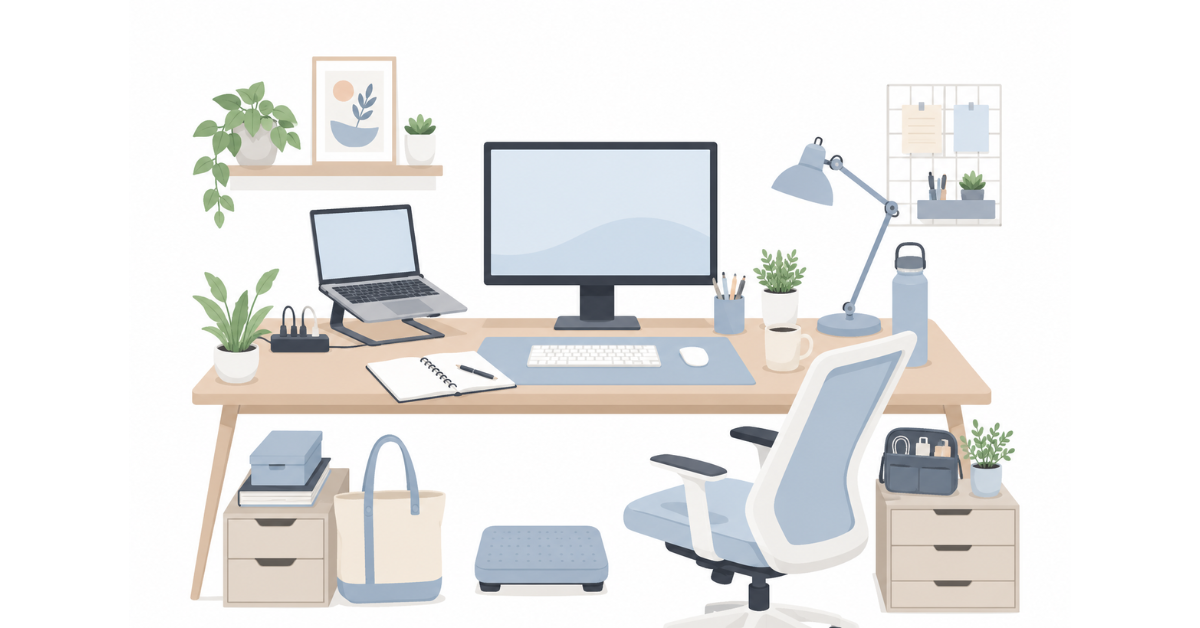
The Ultimate Work From Home Essentials Checklist: 25 Must-Haves for a Productive Home Office (2026 Edition)
Working from home has become more than just a temporary trend—it’s now a normal part of professional life for millions of people around the world. Whether you’re a full-time remote employee, a freelancer, a business owner, or someone who works from home a few days each week, having the right workspace can make a significant difference in your productivity, comfort, and overall well-being.
A productive home office isn’t about buying the most expensive equipment or filling your desk with trendy gadgets. Instead, it’s about choosing practical essentials that help you stay organized, work comfortably, and create an environment where you can do your best work every day.
That’s exactly what this guide is designed to help you do.
In this comprehensive checklist, you’ll discover 25 essential work-from-home items across key categories like workspace setup, productivity, organization, comfort, and workspace ambience. Instead of overwhelming you with endless product recommendations, we’ll explain why each item matters, what to look for, and how it can improve your daily work experience.
Whether you’re setting up your very first home office or looking to upgrade your existing workspace, this checklist will help you prioritize the essentials and build a workspace that supports the way you work.
Let’s get started.
The 25 Work From Home Essentials at a Glance
If you’re short on time, here’s a quick overview of the essentials covered in this guide. Use this checklist to see what you already have and identify the items that can make the biggest difference to your home office setup.
Workspace Foundation
☐ Ergonomic Desk
☐ Comfortable Office Chair
☐ Monitor or External Display
☐ Laptop Stand
☐ External Keyboard & Mouse
Productivity Essentials
☐ Notebook
☐ Planner or To-Do System
☐ Desk Organizer
☐ Mouse Pad
☐ Productivity Timer
Organization & Cable Management
☐ Cable Organizer
☐ Pen Holder
☐ Storage Boxes or Drawers
☐ Document/File Organizer
Comfort & Wellness
☐ Desk Lamp
☐ Footrest
☐ Wrist Rest
☐ Reusable Water Bottle
Focus & Workspace Ambience
☐ Indoor Plant
☐ Wall Art or Inspirational Prints
☐ Coffee or Tea Mug
☐ Noise-Cancelling Headphones
Everyday Work Essentials
☐ Tote Bag
☐ Laptop Sleeve
☐ Tech Organizer Pouch
Whether you’re building a new home office or improving an existing one, you don’t need to buy everything at once. Start with the essentials that solve your biggest challenges today, then gradually add the rest as your workspace evolves.
Workspace Foundation: Build a Productive Home Office
Before you think about productivity apps, desk accessories, or workspace décor, it’s important to get the basics right. A strong workspace foundation creates a comfortable environment where you can stay focused, reduce physical strain, and work more efficiently throughout the day.
These five essentials form the backbone of almost every productive home office, whether you’re working from a dedicated room or a small corner of your living space.
1. Ergonomic Desk
Your desk is the centerpiece of your workspace. It should provide enough surface area for your daily essentials while allowing you to work comfortably for extended periods. The right desk helps you maintain good posture, keeps frequently used items within easy reach, and creates a dedicated space that separates work from the rest of your home.
What to Look For
- A size that comfortably fits your work equipment
- A stable and durable build
- Sufficient legroom
- A height that supports proper sitting posture
- A design that complements your available space
2. Comfortable Office Chair
If you spend several hours working each day, a comfortable chair is one of the best investments you can make. Sitting in an unsupportive chair for long periods can lead to back pain, neck strain, and fatigue, making it harder to stay productive.
An ergonomic office chair encourages better posture and provides the support needed for long work sessions.
What to Look For
- Adjustable seat height
- Lumbar support
- Comfortable cushioning
- Adjustable armrests
- Smooth mobility and stability
3. Monitor or External Display
Working on a larger screen can make everyday tasks easier, especially if you regularly use spreadsheets, design software, multiple browser windows, or video conferencing tools. An external monitor provides more screen space and can help reduce eye strain caused by constantly switching between tabs on a smaller laptop display.
If a monitor isn’t practical for your workspace, consider arranging your laptop at eye level using a stand to create a more comfortable viewing position.
What to Look For
- Screen size suitable for your workspace
- Full HD or higher resolution
- Adjustable height or compatibility with monitor stands
- Anti-glare display for improved viewing comfort
4. Laptop Stand
A laptop placed directly on a desk often forces you to look downward, which can lead to poor posture and neck discomfort over time. A laptop stand raises your screen closer to eye level, helping you maintain a more natural sitting position throughout the day.
It’s a simple addition that can make your workspace noticeably more comfortable, especially when paired with an external keyboard and mouse.
What to Look For
- Stable construction
- Adjustable height or angle
- Good ventilation for airflow
- Compatibility with your laptop size
5. External Keyboard & Mouse
Once your laptop is raised on a stand, an external keyboard and mouse become essential for maintaining a comfortable typing position. They allow your arms, wrists, and shoulders to stay in a more natural posture, reducing strain during long hours of work.
They also offer greater precision and comfort compared to using a laptop’s built-in keyboard and trackpad, particularly for tasks that involve frequent typing or detailed navigation.
What to Look For
- Comfortable key layout
- Responsive and accurate mouse
- Wired or wireless connectivity based on your preference
- Ergonomic design for extended use
Building Your Workspace One Step at a Time
If you’re starting from scratch, don’t feel pressured to purchase everything at once. Begin with a reliable desk and a comfortable chair, then gradually add the remaining essentials as your needs and budget allow. Even a few thoughtful upgrades can significantly improve your daily work experience.
Productivity Essentials for Working From Home
Once you’ve built a comfortable workspace, the next step is improving how you work within it. Productivity isn’t about being busy—it’s about staying organized, reducing distractions, and making it easier to focus on the tasks that matter most.
The following essentials may seem simple, but together they can have a significant impact on your daily workflow.
6. Notebook
Despite the many digital tools available today, a notebook remains one of the most effective ways to capture ideas, jot down meeting notes, create to-do lists, or sketch out plans. Writing things down can help improve focus, reduce mental clutter, and make important information easier to remember.
A dedicated work notebook also keeps your thoughts organized in one place, making it easy to revisit ideas and track progress over time.
What to Look For
- Good-quality paper that prevents ink bleed-through
- A durable cover for everyday use
- A size that’s easy to carry or fits comfortably on your desk
- A layout that suits your workflow, whether lined, dotted, or plain
Looking for a minimalist notebook for work or study? Explore STOKRI’s collection of productivity notebooks designed for modern professionals.
7. Planner or To-Do System
Keeping track of tasks, deadlines, and appointments is essential when working from home. Without the structure of a traditional office, it’s easy to lose track of priorities or become overwhelmed by multiple responsibilities.
Whether you prefer a paper planner or a digital task manager, having a reliable planning system helps you stay organized and maintain a clear sense of direction throughout the day.
What to Look For
- Enough space for daily or weekly planning
- Easy-to-follow layouts
- Sections for priorities and deadlines
- A format you’ll enjoy using consistently
8. Desk Organizer
A cluttered desk can quickly become a distraction. Pens, sticky notes, charging cables, and other small items tend to pile up over time, making your workspace feel chaotic.
A desk organizer keeps frequently used supplies within easy reach while helping maintain a cleaner and more efficient workspace.
What to Look For
- Compartments that suit your storage needs
- A compact design that doesn’t take up unnecessary space
- Durable materials
- Easy access to everyday items
9. Mouse Pad
A mouse pad might seem like a small accessory, but it can improve both comfort and precision during long work sessions. It provides a smooth surface for better mouse tracking while protecting your desk from scratches and daily wear.
If you spend several hours at your computer each day, a quality mouse pad can make your workspace more comfortable and enjoyable to use.
What to Look For
- A smooth, consistent surface
- A non-slip base
- Enough space for comfortable mouse movement
- Durable stitching and materials for long-term use
STOKRI Tip: A clean, well-designed mouse pad can complement your workspace while providing the comfort and functionality you use every day.
10. Productivity Timer
Maintaining focus while working from home can be challenging, especially with frequent interruptions and digital distractions. A productivity timer encourages you to work in dedicated focus sessions followed by short breaks, helping you stay energized throughout the day.
Techniques like the Pomodoro Method are popular because they make large tasks feel more manageable and help reduce procrastination.
What to Look For
- Easy-to-use controls
- Adjustable timer durations
- Clear alerts that aren’t overly distracting
- A format that fits your workflow, whether physical or digital
Stay Organized, Stay Consistent
The best productivity system isn’t the one with the most tools—it’s the one you’ll actually use every day. Start with a few essentials that support your workflow, build consistent habits, and add new tools only when they genuinely solve a problem.
Organization & Cable Management for a Clutter-Free Home Office
A clean and organized workspace does more than just look good—it helps you think clearly, find what you need quickly, and stay focused on your work. When everything has its place, you’re less likely to waste time searching for supplies or become distracted by unnecessary clutter.
These simple organization essentials can make your home office feel more efficient and enjoyable to work in.
11. Cable Organizer
Charging cables, monitor wires, and power cords can quickly turn a tidy desk into a tangled mess. Besides affecting the appearance of your workspace, loose cables can make cleaning more difficult and create unnecessary distractions.
A cable organizer helps keep wires neatly arranged, making your desk safer, cleaner, and easier to maintain.
What to Look For
- Easy installation
- Strong cable grip
- Compatibility with multiple cable sizes
- A design that keeps cables accessible when needed
12. Pen Holder
Pens, pencils, highlighters, scissors, and other stationery are easier to use when they’re stored in one convenient place. A pen holder keeps your everyday writing tools within reach while preventing your desk from becoming cluttered.
It’s a small addition that contributes to a more organized and professional-looking workspace.
What to Look For
- Enough space for your everyday stationery
- A sturdy and stable base
- A compact design that doesn’t take up too much desk space
- Materials that complement your workspace style
13. Storage Boxes or Drawers
Not everything needs to stay on your desk. Documents, notebooks, chargers, office supplies, and personal items can quickly accumulate, making your workspace feel crowded.
Storage boxes or drawers provide a dedicated place for items you don’t use every day, helping maintain a clean and distraction-free work environment.
What to Look For
- Appropriate size for your storage needs
- Easy access to frequently used items
- Durable construction
- Stackable or modular options if space is limited
14. Document/File Organizer
Whether you handle invoices, contracts, study materials, or important paperwork, keeping documents organized saves time and reduces stress. A file organizer makes it easier to locate what you need while protecting papers from damage or misplacement.
Even if most of your work is digital, having a system for managing physical documents can help keep your workspace organized.
What to Look For
- Multiple compartments or sections
- Durable materials
- Easy-to-label dividers
- A size that fits your available workspace
An Organized Workspace Supports Better Focus
Organization isn’t about having a perfectly spotless desk—it’s about creating a workspace where everything you need is easy to find and unnecessary distractions are kept to a minimum. A few simple organizational tools can make your daily workflow smoother and help you stay focused on what matters most.
Comfort & Wellness for Long Workdays
Working from home often means spending long hours at your desk. While productivity is important, your comfort and well-being should never be overlooked. Small changes to your workspace can reduce fatigue, improve posture, and make your workday far more enjoyable.
These essentials are designed to help you stay comfortable, healthy, and focused throughout the day.
15. Desk Lamp
Good lighting plays an important role in creating a comfortable and productive workspace. Relying solely on overhead lighting or natural light isn’t always enough, especially during early mornings, evenings, or cloudy days.
A desk lamp provides focused illumination for your workspace, helping reduce eye strain and making reading, writing, and computer work more comfortable.
What to Look For
- Adjustable brightness levels
- Flexible or adjustable arm
- LED lighting for energy efficiency
- A design that fits comfortably on your desk
16. Footrest
A footrest may seem like a small addition, but it can make a noticeable difference if your feet don’t rest comfortably on the floor. It encourages better sitting posture by supporting your legs and reducing pressure on your lower back.
For people who spend several hours sitting each day, a footrest can improve overall comfort and help reduce fatigue.
What to Look For
- Non-slip surface
- Comfortable angle
- Adjustable height if possible
- Stable and durable construction
17. Wrist Rest
Typing and using a mouse for extended periods can place strain on your wrists. A wrist rest provides additional support and encourages a more natural hand position while working.
Although it isn’t essential for everyone, many people find it improves comfort during long work sessions.
What to Look For
- Soft but supportive cushioning
- Non-slip base
- Appropriate size for your keyboard or mouse
- Easy-to-clean material
18. Reusable Water Bottle
It’s surprisingly easy to forget to drink enough water when you’re focused on work. Keeping a reusable water bottle on your desk serves as a simple reminder to stay hydrated throughout the day.
Proper hydration supports concentration, helps reduce fatigue, and contributes to your overall well-being, making it one of the easiest habits to build into your work routine.
What to Look For
- Leak-proof design
- Easy to clean
- Suitable capacity for your workday
- Insulated options if you prefer hot or cold beverages
Comfort Leads to Better Productivity
Creating a productive home office isn’t just about technology—it’s also about taking care of yourself. Comfortable lighting, proper support, and healthy daily habits can help you stay energized and focused throughout the day, making your workspace one you’ll actually enjoy spending time in.
Focus & Workspace Ambience: Make Your Home Office Inspiring
A productive workspace isn’t just about functionality—it’s also about how the space makes you feel. The right ambience can improve your mood, reduce stress, and make it easier to stay motivated throughout the day.
Simple additions like plants, artwork, or a favorite coffee mug can transform an ordinary desk into a workspace that feels personal, inspiring, and enjoyable.
19. Indoor Plant
Adding a small indoor plant is one of the easiest ways to make your workspace feel more welcoming. Plants introduce a touch of nature, soften the look of your desk, and can create a calmer, more relaxing environment.
Even if you don’t have a green thumb, there are plenty of low-maintenance plants that require very little care while adding life to your workspace.
What to Look For
- Low-maintenance varieties
- Suitable size for your desk
- Indoor-friendly plants
- Pots that complement your workspace décor
20. Wall Art or Inspirational Prints
Blank walls can make a workspace feel plain and uninspiring. Thoughtfully chosen wall art or inspirational prints can add personality to your office while creating an environment that reflects your style and keeps you motivated.
Whether you prefer minimalist designs, motivational quotes, or creative artwork, the right décor can make your workspace feel like a place where you enjoy spending time.
What to Look For
- Designs that match your workspace aesthetic
- Positive and meaningful messages
- High-quality prints
- Appropriate size for your available wall space
Looking to personalize your workspace? Explore STOKRI’s collection of minimalist workspace posters and inspirational wall art designed for modern professionals.
21. Coffee or Tea Mug
For many people, a cup of coffee or tea is an essential part of the workday. Having a dedicated mug at your desk makes it easy to enjoy your favorite beverage while staying focused on your tasks.
Beyond its practical use, a mug can also add a bit of personality to your workspace. Whether it’s a motivational quote, a creative design, or a simple minimalist style, it’s one of those small details that makes your desk feel more like your own.
What to Look For
- Comfortable handle
- Durable material
- Suitable capacity
- A design that reflects your personality
Looking for a mug that complements your workspace? Explore STOKRI’s collection of minimalist and work-inspired coffee mugs.
22. Noise-Cancelling Headphones
Working from home often comes with unexpected distractions, whether it’s household noise, traffic, or nearby conversations. Noise-cancelling headphones can help create a quieter environment, making it easier to concentrate on important tasks or participate in virtual meetings.
Even if you don’t choose noise-cancelling models, a comfortable pair of headphones can improve focus by allowing you to listen to music, podcasts, or white noise while you work.
What to Look For
- Comfortable fit for extended use
- Good sound quality
- Reliable microphone for video calls
- Wired or wireless connectivity based on your preference
Your Workspace Should Inspire You
The most productive workspace isn’t always the most expensive—it’s the one that makes you feel comfortable, motivated, and ready to do your best work. Small personal touches can make a significant difference, turning your desk into a place where you genuinely enjoy spending time.
Everyday Work Essentials for Remote Professionals
Working from home doesn’t always mean staying at home. Whether you’re heading to a coworking space, attending meetings, or simply moving between rooms, having the right everyday essentials helps you stay organized and ready to work wherever you are.
These items protect your equipment, keep your accessories organized, and make it easier to carry your workspace with you.
23. Tote Bag
A sturdy tote bag is a practical everyday companion for carrying your laptop, notebook, chargers, water bottle, and other work essentials. Unlike bulky backpacks, a well-designed tote bag offers quick access to your belongings while maintaining a clean and professional look.
It’s especially useful for professionals who split their time between home, the office, cafés, or coworking spaces.
What to Look For
- Durable materials
- Comfortable shoulder straps
- Spacious interior
- Internal pockets for better organization
- A design suitable for both work and everyday use
Looking for a stylish and functional tote bag? Explore STOKRI’s collection of minimalist tote bags designed for work, travel, and everyday carry.
24. Laptop Sleeve
Your laptop is one of your most valuable work tools, and protecting it should be a priority. A laptop sleeve helps safeguard your device from scratches, dust, and minor bumps while making it easier to carry between locations.
Even if you mostly work from home, a laptop sleeve provides an extra layer of protection when storing or transporting your device.
What to Look For
- Correct size for your laptop
- Padded interior for protection
- Durable exterior material
- Secure zipper or closure
25. Tech Organizer Pouch
Chargers, USB drives, memory cards, cables, and adapters are easy to misplace if they’re stored loosely in a bag or drawer. A tech organizer pouch keeps all your small accessories neatly organized and easy to find whenever you need them.
It’s a simple solution that saves time and prevents the frustration of searching for essential accessories before meetings or travel.
What to Look For
- Multiple compartments
- Durable construction
- Compact and travel-friendly design
- Secure zippers or elastic holders
Build a Workspace That Grows With You
Your workspace doesn’t have to be perfect from day one. Start with the essentials that support your daily routine, then upgrade gradually as your needs evolve. The goal isn’t to own every accessory—it’s to create a workspace that helps you stay comfortable, organized, and productive every day.
Frequently Asked Questions (FAQs)
What are the most important work from home essentials?
If you’re just getting started, focus on the basics first: a comfortable desk and chair, a laptop or computer, a monitor (if needed), a notebook, and good lighting. As your needs grow, you can gradually add accessories like cable organizers, desk organizers, and ergonomic tools to improve your workspace.
How can I set up a productive home office on a budget?
You don’t need to buy everything at once. Start with the essentials that have the biggest impact on your comfort and productivity. Reuse furniture you already own where possible, prioritize ergonomic improvements, and upgrade your workspace gradually as your budget allows.
What should I buy first for a work-from-home setup?
A comfortable chair and a suitable desk should be your top priorities. Once those are in place, consider adding a laptop stand, external keyboard and mouse, proper lighting, and a few organization tools to create a more efficient workspace.
How do I make my home office more comfortable?
Focus on ergonomics and your daily work habits. Adjust your chair and desk for better posture, ensure your screen is at eye level, use proper lighting, stay hydrated, and keep frequently used items within easy reach. Small improvements can make a noticeable difference over time.
Which accessories actually improve productivity?
Some of the most useful productivity accessories include a notebook, planner, desk organizer, cable organizer, mouse pad, and a productivity timer. These tools help reduce distractions, keep your workspace organized, and make it easier to stay focused throughout the day.
Do I need a dedicated room to work from home?
Not at all. Many people work effectively from a small corner of their bedroom, living room, or dining area. The key is to create a dedicated workspace that minimizes distractions and supports your daily work routine, regardless of its size.
Conclusion
Building a productive home office isn’t about filling your desk with the latest gadgets—it’s about creating a workspace that helps you work comfortably, stay organized, and remain focused every day.
Whether you’re setting up your first home office or improving an existing one, start with the essentials that will have the greatest impact on your daily routine. As your needs evolve, you can gradually add tools and accessories that make your workspace even more functional and enjoyable.
Remember, the best workspace is the one that works for you. By choosing practical essentials, maintaining an organized environment, and adding personal touches that inspire you, you’ll create a home office that’s designed for long-term productivity and well-being.
We hope this checklist has helped you identify the essentials you need to build a workspace you’ll enjoy using every day.
Continue Exploring
If you found this guide helpful, here are two more articles to help you build a more productive workspace and discover thoughtful work-related gift ideas.
🎁 25 Thoughtful Work From Home Gifts That Make Every Workday Better
Looking for practical gift ideas for remote workers? Discover useful and meaningful work-from-home gifts that combine productivity, comfort, and everyday functionality.
→ Read the Work From Home Gifts Guide
💼 9 Thoughtful Office Gift Ideas for Office Professionals They’ll Actually Use
Whether you’re shopping for a coworker, manager, employee, or friend, explore office gift ideas that are both practical and memorable for today’s professionals.

Related posts
A home office can be perfectly functional and still feel like it belongs to nobody. You may have a desk, a chair and everything you... Continue reading
A productive workspace isn’t built by one expensive purchase—it’s shaped by the small things you use every day. The right office desk accessories can help... Continue reading